# Version 10.3

## <span style="text-decoration: underline;"><a name="_Toc163722080"></a><span style="mso-fareast-font-family: Arial;"><span style="mso-list: Ignore;">1.<span style="font: 7.0pt 'Times New Roman';"> </span></span></span>NOUVEAUTES</span>

### <span style="text-decoration: underline;"><a name="_Toc163722081"></a><span lang="IT" style="mso-fareast-font-family: Arial; mso-ansi-language: IT;"><span style="mso-list: Ignore;">1.1<span style="font: 7.0pt 'Times New Roman';"> </span></span></span><span lang="IT" style="mso-ansi-language: IT;">ESAT v2</span></span>

#### <span style="text-decoration: underline;"><a name="_Toc163722082"></a><span lang="IT" style="mso-fareast-font-family: Arial; mso-ansi-language: IT;"><span style="mso-list: Ignore;">1.1.1<span style="font: 7.0pt 'Times New Roman';"> </span></span></span>Parcours professionnel</span>

<span lang="IT" style="mso-ansi-language: IT;"> </span>

Le parcours professionnel sera disponible pour les établissements utilisant <span style="mso-fareast-font-family: Arial; mso-bidi-font-family: Arial;">le modèle “Établissement de travail pour adultes handicapés”.</span>

<span style="mso-fareast-font-family: Arial; mso-bidi-font-family: Arial;">Celui-ci est composé de trois volets :</span>

- <span style="font-family: 'Calibri',sans-serif; mso-fareast-font-family: Calibri;"><span style="mso-list: Ignore;">-<span style="font: 7.0pt 'Times New Roman';"> </span></span></span><span style="mso-fareast-font-family: Arial; mso-bidi-font-family: Arial;">Formations</span>
- <span style="font-family: 'Calibri',sans-serif; mso-fareast-font-family: Calibri;"><span style="mso-list: Ignore;">-<span style="font: 7.0pt 'Times New Roman';"> </span></span></span><span style="mso-fareast-font-family: Arial; mso-bidi-font-family: Arial;">Expériences</span>
- <span style="font-family: 'Calibri',sans-serif; mso-fareast-font-family: Calibri;"><span style="mso-list: Ignore;">-<span style="font: 7.0pt 'Times New Roman';"> </span></span></span><span style="mso-fareast-font-family: Arial; mso-bidi-font-family: Arial;">Contre-indications</span>

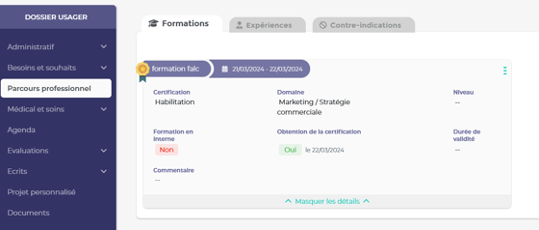
Le volet “Formation” mettra en avant les formations en cours, suivit par la personne accompagnée. Il sera possible de laisser visible une formation achevée si cela est pertinent pour le parcours de l’usager.

Un archivage sera possible si l’on ne souhaite pas voire d’emblée certaines formations.

<span style="mso-fareast-font-family: Arial; mso-bidi-font-family: Arial;">Il sera possible de saisir des formations réalisées par le passé afin de garder un historique du parcours de formation complet de l’usager.</span>

[![image.png](https://documentation.livia-parcoursdevie.fr/uploads/images/gallery/2024-04/scaled-1680-/image.png)](https://documentation.livia-parcoursdevie.fr/uploads/images/gallery/2024-04/image.png)

<span style="mso-no-proof: yes;"> </span>

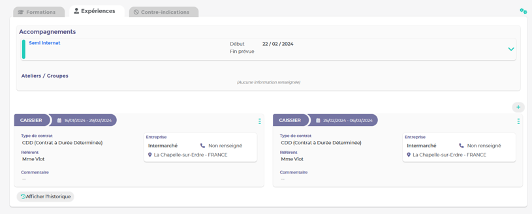
Le volet “Expérience” mettra en avant les expériences professionnelles de l’usager. Cette partie permettra une visualisation complète de son parcours professionnel. Celui-ci sera composé du parcours institutionnel, c’est à dire d’un rappel des éléments liés à l’accompagnement au sein de la structure d’accueil de l’usager, ainsi que des expériences professionnelles réalisées auprès d’entreprises partenaires.

Il sera possible de laisser visible une expérience

Un archivage sera possible si l’on ne souhaite pas voire d’emblée certaines formations.

Il sera possible de saisir des expériences passées afin de garder un historique du parcours d’expérience complet de l’usager.

[![image.png](https://documentation.livia-parcoursdevie.fr/uploads/images/gallery/2024-04/scaled-1680-/cp8image.png)](https://documentation.livia-parcoursdevie.fr/uploads/images/gallery/2024-04/cp8image.png)
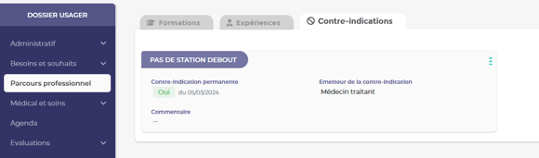
Le volet contre-indication permettra la mise en avant des contre-indications permanentes ou temporaires en lien avec l’emploi de l’usager.

Il sera possible de connaitre quel professionnel est à l’origine de la mise en place de la contre-indication (ex: médecine du travail, médecin traitant, autre …)

Une contre-indication pourra rester visible, même si celle-ci est passée, ou de l'archiver au besoin.

Un historique sera conservé.

<span style="text-decoration: underline;">[![image.png](https://documentation.livia-parcoursdevie.fr/uploads/images/gallery/2024-04/scaled-1680-/a1gimage.png)](https://documentation.livia-parcoursdevie.fr/uploads/images/gallery/2024-04/a1gimage.png)</span>

<span style="text-decoration: underline;"><span style="mso-no-proof: yes;"> </span></span>

<table border="1" cellpadding="0" cellspacing="0" class="MsoTableGrid" id="bkmrk-activation-du-module" style="border-collapse: collapse; mso-table-layout-alt: fixed; border: none; mso-border-alt: solid #F4B083 1.5pt; mso-border-themecolor: accent2; mso-border-themetint: 153; mso-yfti-tbllook: 1696; mso-padding-alt: 0cm 5.4pt 0cm 5.4pt; mso-border-insideh: 1.5pt solid #F4B083; mso-border-insideh-themecolor: accent2; mso-border-insideh-themetint: 153; mso-border-insidev: 1.5pt solid #F4B083; mso-border-insidev-themecolor: accent2; mso-border-insidev-themetint: 153;"><tbody><tr style="mso-yfti-irow: 0; mso-yfti-firstrow: yes; mso-yfti-lastrow: yes; height: 15.0pt;"><td style="width: 538.5pt; border: solid #F4B083 1.5pt; mso-border-themecolor: accent2; mso-border-themetint: 153; background: #F7CAAC; mso-background-themecolor: accent2; mso-background-themetint: 102; padding: 0cm 5.4pt 0cm 5.4pt; height: 15.0pt;" valign="top" width="718"><span style="color: black;">Activation du module</span><span style="color: black;"> :</span>

<span style="color: black;">Disponible pour tous les structures</span>

<span style="color: black;">Activé par défaut pour les profils de type “Administratif” et “Socio-éducatif”</span>

<span style="color: black;">Gestion des droits : Administration établissement - profils et utilisateurs – Profils - Sélection d’un profil - Gérer les droits – Volet “Administratif” - “Budget personnel”</span>

<span style="text-decoration: underline;"><span style="mso-fareast-font-family: Arial; mso-bidi-font-family: Arial;"> </span></span>

</td></tr></tbody></table>

<span style="text-decoration: underline;"><span lang="IT" style="mso-ansi-language: IT;"> </span></span>

#### <span style="text-decoration: underline;"><a name="_Toc163722083"></a><span lang="IT" style="mso-fareast-font-family: Arial; mso-ansi-language: IT;"><span style="mso-list: Ignore;">1.1.2<span style="font: 7.0pt 'Times New Roman';"> </span></span></span>Catégories annuaires</span>

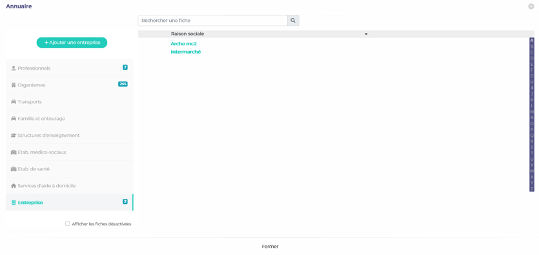
En lien avec la fonctionnalité du parcours professionnel, une nouvelle catégorie a été ajoutée dans l’annuaire Livia. La catégorie “Entreprises” permettra la création des entreprises dans lesquelles les personnes accompagnées ont réalisé leurs différentes expériences professionnelles.

<span style="text-decoration: underline;">[![image.png](https://documentation.livia-parcoursdevie.fr/uploads/images/gallery/2024-04/scaled-1680-/dxgimage.png)](https://documentation.livia-parcoursdevie.fr/uploads/images/gallery/2024-04/dxgimage.png)</span>

<span style="text-decoration: underline;"><span style="mso-no-proof: yes;"> </span></span>

<table border="1" cellpadding="0" cellspacing="0" class="MsoTableGrid" id="bkmrk-activation-du-module-1" style="border-collapse: collapse; mso-table-layout-alt: fixed; border: none; mso-border-alt: solid #F4B083 1.5pt; mso-border-themecolor: accent2; mso-border-themetint: 153; mso-yfti-tbllook: 1696; mso-padding-alt: 0cm 5.4pt 0cm 5.4pt; mso-border-insideh: 1.5pt solid #F4B083; mso-border-insideh-themecolor: accent2; mso-border-insideh-themetint: 153; mso-border-insidev: 1.5pt solid #F4B083; mso-border-insidev-themecolor: accent2; mso-border-insidev-themetint: 153;"><tbody><tr style="mso-yfti-irow: 0; mso-yfti-firstrow: yes; mso-yfti-lastrow: yes; height: 15.0pt;"><td style="width: 538.5pt; border: solid #F4B083 1.5pt; mso-border-themecolor: accent2; mso-border-themetint: 153; background: #F7CAAC; mso-background-themecolor: accent2; mso-background-themetint: 102; padding: 0cm 5.4pt 0cm 5.4pt; height: 15.0pt;" valign="top" width="718"><span style="text-decoration: underline;"><span style="color: black; text-decoration: underline;">Activation du module</span><span style="color: black; text-decoration: underline;"> :</span></span>

<span style="text-decoration: underline;"><span style="color: black; text-decoration: underline;">Aucune activation nécessaire</span></span>

</td></tr></tbody></table>

#### <span style="text-decoration: underline;"><a name="_Toc163722084"></a><span lang="IT" style="mso-fareast-font-family: Arial; mso-ansi-language: IT;"><span style="mso-list: Ignore;">1.1.3<span style="font: 7.0pt 'Times New Roman';"> </span></span></span>Prévision et pointage des présences en ESAT</span>

##### <span style="text-decoration: underline;"><span lang="IT" style="mso-fareast-font-family: Arial; mso-ansi-language: IT;"><span style="mso-list: Ignore;">1.1.3.1<span style="font: 7.0pt 'Times New Roman';"> </span></span></span><span lang="IT" style="mso-ansi-language: IT;">Prévision des présences</span></span>

<span lang="IT" style="mso-ansi-language: IT;"> </span>

La fonctionnalité “prévision des présences” est à présent disponible pour les établissements rattachés au modèle “Etablissements de travail pour adultes handicapés”.

Cet écran a pour but de prévoir les jours effectifs d’accompagnement pour un usager ayant un séjour actif. Il sera possible d’y saisir le planning prévisionnel de présence des personnes accompagnées à la journée ou à la demi-journée. Des roulements de présence peuvent être mis en place.

Les absences prévues seront visibles dans cet écran. Une saisie y sera également possible.

<table border="1" cellpadding="0" cellspacing="0" class="MsoTableGrid" id="bkmrk-activation-du-module-2" style="border-collapse: collapse; mso-table-layout-alt: fixed; border: none; mso-border-alt: solid #F4B083 1.5pt; mso-border-themecolor: accent2; mso-border-themetint: 153; mso-yfti-tbllook: 1696; mso-padding-alt: 0cm 5.4pt 0cm 5.4pt; mso-border-insideh: 1.5pt solid #F4B083; mso-border-insideh-themecolor: accent2; mso-border-insideh-themetint: 153; mso-border-insidev: 1.5pt solid #F4B083; mso-border-insidev-themecolor: accent2; mso-border-insidev-themetint: 153;"><tbody><tr style="mso-yfti-irow: 0; mso-yfti-firstrow: yes; mso-yfti-lastrow: yes; height: 15.0pt;"><td style="width: 538.5pt; border: solid #F4B083 1.5pt; mso-border-themecolor: accent2; mso-border-themetint: 153; background: #F7CAAC; mso-background-themecolor: accent2; mso-background-themetint: 102; padding: 0cm 5.4pt 0cm 5.4pt; height: 15.0pt;" valign="top" width="718"><u><span style="mso-fareast-font-family: Arial; mso-bidi-font-family: Arial; color: black; mso-color-alt: windowtext;">Activation du module</span></u><span style="mso-fareast-font-family: Arial; mso-bidi-font-family: Arial; color: black; mso-color-alt: windowtext;"> :</span>

<span style="mso-fareast-font-family: Arial; mso-bidi-font-family: Arial; color: black; mso-color-alt: windowtext;">Activé par défaut pour les profils de type “Administratif” et “socio-éducatif”</span>

<span style="mso-fareast-font-family: Arial; mso-bidi-font-family: Arial; color: black; mso-color-alt: windowtext;">Gestion des droits :</span>

<span style="mso-fareast-font-family: Arial; mso-bidi-font-family: Arial; color: black; mso-color-alt: windowtext;">Administration établissement - profils et utilisateurs – Profils - Sélection d’un profil - Gérer les droits – Volet “Organiser” - “Prévision des présences”</span>

</td></tr></tbody></table>

##### <span style="text-decoration: underline;"><span lang="IT" style="mso-fareast-font-family: Arial; mso-ansi-language: IT;"><span style="mso-list: Ignore;">1.1.3.2<span style="font: 7.0pt 'Times New Roman';"> </span></span></span><span lang="IT" style="mso-ansi-language: IT;">Pointage des présences</span></span>

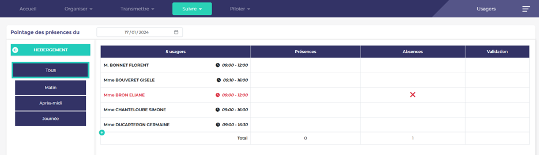
<span style="mso-fareast-font-family: Arial; mso-bidi-font-family: Arial;">En lien avec la fonctionnalité de prévision des présences, il est à présent possible de réaliser le pointage des présences des usagers.</span>

<span style="mso-fareast-font-family: Arial; mso-bidi-font-family: Arial;">Pour cela quelques prérequis devront être respectés :</span>

- <span style="font-family: 'Calibri',sans-serif; mso-fareast-font-family: Calibri;"><span style="mso-list: Ignore;">-<span style="font: 7.0pt 'Times New Roman';"> </span></span></span><span style="mso-fareast-font-family: Arial; mso-bidi-font-family: Arial;">Un planning prévisionnel de présence devra être saisi dans la fonctionnalité “prévision des présences”</span>
- <span style="font-family: 'Calibri',sans-serif; mso-fareast-font-family: Calibri;"><span style="mso-list: Ignore;">-<span style="font: 7.0pt 'Times New Roman';"> </span></span></span><span style="mso-fareast-font-family: Arial; mso-bidi-font-family: Arial;">Les usagers devront être affecté à au moins un mode de regroupement (activité finess par exemple)</span>
- <span style="font-family: 'Calibri',sans-serif; mso-fareast-font-family: Calibri;"><span style="mso-list: Ignore;">-<span style="font: 7.0pt 'Times New Roman';"> </span></span></span><span style="mso-fareast-font-family: Arial; mso-bidi-font-family: Arial;">Les droits en lien avec la fonctionnalité devront être gérés</span>

[![image.png](https://documentation.livia-parcoursdevie.fr/uploads/images/gallery/2024-04/scaled-1680-/6Opimage.png)](https://documentation.livia-parcoursdevie.fr/uploads/images/gallery/2024-04/6Opimage.png)

<span style="mso-fareast-font-family: Arial; mso-bidi-font-family: Arial;">L’objectif de cette fonctionnalité est de vérifier au jour le jour la véracité du planning prévisionnel des présences en confirmant ou non la présence effective des personnes accompagnées.</span>

<span style="mso-fareast-font-family: Arial; mso-bidi-font-family: Arial;">Deux niveaux de droits sont disponibles avec cette fonctionnalité :</span>

- <span style="font-family: 'Calibri',sans-serif; mso-fareast-font-family: Calibri;"><span style="mso-list: Ignore;">-<span style="font: 7.0pt 'Times New Roman';"> </span></span></span><span style="mso-fareast-font-family: Arial; mso-bidi-font-family: Arial;">La vérification quotidienne de la présence et ou absence</span>
- <span style="font-family: 'Calibri',sans-serif; mso-fareast-font-family: Calibri;"><span style="mso-list: Ignore;">-<span style="font: 7.0pt 'Times New Roman';"> </span></span></span><span style="mso-fareast-font-family: Arial; mso-bidi-font-family: Arial;">La validation d’un événement non prévu</span>

<span style="mso-fareast-font-family: Arial; mso-bidi-font-family: Arial;">En effet plusieurs types d’événements pourront être signifiés dans le tableau de pointage des présences et certains pourront nécessiter une vérification de la part d’une personne habilitée.</span>

<span style="mso-fareast-font-family: Arial; mso-bidi-font-family: Arial;">Voici les différents types d’événements pouvant être traités via la fonctionnalité de pointage des présences</span>

- <span style="font-family: 'Calibri',sans-serif; mso-fareast-font-family: Calibri;"><span style="mso-list: Ignore;">-<span style="font: 7.0pt 'Times New Roman';"> </span></span></span><span style="mso-fareast-font-family: Arial; mso-bidi-font-family: Arial;">Confirmer une présence prévue,</span>
- <span style="font-family: 'Calibri',sans-serif; mso-fareast-font-family: Calibri;"><span style="mso-list: Ignore;">-<span style="font: 7.0pt 'Times New Roman';"> </span></span></span><span style="mso-fareast-font-family: Arial; mso-bidi-font-family: Arial;">Confirmer une absence prévue,</span>

<span style="mso-fareast-font-family: Arial; mso-bidi-font-family: Arial;">Ces deux premiers événements étant considérés comme “normaux”, aucune validation complémentaire n’est demandée.</span>

- <span style="font-family: 'Calibri',sans-serif; mso-fareast-font-family: Calibri;"><span style="mso-list: Ignore;">-<span style="font: 7.0pt 'Times New Roman';"> </span></span></span><span style="mso-fareast-font-family: Arial; mso-bidi-font-family: Arial;">Signaler une absence non prévue</span>
- <span style="font-family: 'Calibri',sans-serif; mso-fareast-font-family: Calibri;"><span style="mso-list: Ignore;">-<span style="font: 7.0pt 'Times New Roman';"> </span></span></span><span style="mso-fareast-font-family: Arial; mso-bidi-font-family: Arial;">Signaler un retour d’absence avant la date prévue initialement</span>
- <span style="font-family: 'Calibri',sans-serif; mso-fareast-font-family: Calibri;"><span style="mso-list: Ignore;">-<span style="font: 7.0pt 'Times New Roman';"> </span></span></span><span style="mso-fareast-font-family: Arial; mso-bidi-font-family: Arial;">Signaler une présence non prévue</span>

<span style="mso-fareast-font-family: Arial; mso-bidi-font-family: Arial;">Ces trois actions nécessitent la validation d’une tierce personne pour, par exemple, appeler les familles et intervenir sur le module des absences.</span><span style="mso-fareast-font-family: Arial; mso-bidi-font-family: Arial;"> </span>

<table border="1" cellpadding="0" cellspacing="0" class="MsoTableGrid" id="bkmrk-activation-du-module-3" style="border-collapse: collapse; mso-table-layout-alt: fixed; border: none; mso-border-alt: solid #F4B083 1.5pt; mso-border-themecolor: accent2; mso-border-themetint: 153; mso-yfti-tbllook: 1696; mso-padding-alt: 0cm 5.4pt 0cm 5.4pt; mso-border-insideh: 1.5pt solid #F4B083; mso-border-insideh-themecolor: accent2; mso-border-insideh-themetint: 153; mso-border-insidev: 1.5pt solid #F4B083; mso-border-insidev-themecolor: accent2; mso-border-insidev-themetint: 153;"><tbody><tr style="mso-yfti-irow: 0; mso-yfti-firstrow: yes; mso-yfti-lastrow: yes; height: 15.0pt;"><td style="width: 538.5pt; border: solid #F4B083 1.5pt; mso-border-themecolor: accent2; mso-border-themetint: 153; background: #F7CAAC; mso-background-themecolor: accent2; mso-background-themetint: 102; padding: 0cm 5.4pt 0cm 5.4pt; height: 15.0pt;" valign="top" width="718"><u><span style="mso-fareast-font-family: Arial; mso-bidi-font-family: Arial; color: black; mso-color-alt: windowtext;">Activation du module</span></u><span style="mso-fareast-font-family: Arial; mso-bidi-font-family: Arial; color: black; mso-color-alt: windowtext;"> :</span>

<span style="mso-fareast-font-family: Arial; mso-bidi-font-family: Arial; color: black; mso-color-alt: windowtext;">Activé par défaut pour les profils de type “Administratif” et “Socio-éducatif”</span>

<span style="mso-fareast-font-family: Arial; mso-bidi-font-family: Arial; color: black; mso-color-alt: windowtext;">Le droit de confirmation est activé par défaut pour les profils de type “Administratif” </span>

<span style="mso-fareast-font-family: Arial; mso-bidi-font-family: Arial; color: black; mso-color-alt: windowtext;">Gestion des droits : Administration établissement - profils et utilisateurs – Profils - Sélection d’un profil - Gérer les droits – Suivre – Pointage des présences</span>

</td></tr></tbody></table>

<span lang="IT" style="mso-ansi-language: IT;"> </span>

### *<a name="_Toc163722085"></a>*<span style="text-decoration: underline;"><span style="mso-fareast-font-family: Arial;"><span style="mso-list: Ignore;">1.2<span style="font-variant: normal; font-kerning: auto; font-optical-sizing: auto; font-feature-settings: normal; font-variation-settings: normal; font-weight: normal; font-stretch: normal; font-size: 7pt; line-height: normal; font-family: 'Times New Roman';"> </span></span></span>Grilles personnalisées</span>

Le module de création des grilles personnalisées permettra la création de grilles d’évaluations simples. Dans un premier temps la grille devra être paramétrée depuis l’administration Livia. Les champs composants la grille pourront ainsi être définit par les administrateurs, puis la grille pourra être diffusée aux utilisateurs, en fonction de leurs profils.

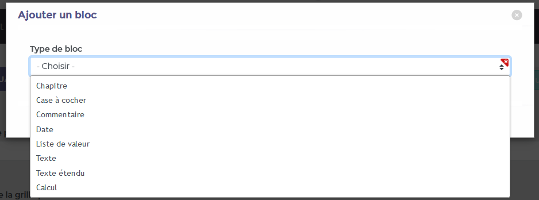
Lors du paramétrage de la grille, des champs types sont mis à dispositions et permettrons d’établir celle-ci

[![image.png](https://documentation.livia-parcoursdevie.fr/uploads/images/gallery/2024-04/scaled-1680-/crqimage.png)](https://documentation.livia-parcoursdevie.fr/uploads/images/gallery/2024-04/crqimage.png)
<span style="mso-no-proof: yes;"> </span>

- <span style="font-family: 'Calibri',sans-serif; mso-fareast-font-family: Calibri;"><span style="mso-list: Ignore;">-<span style="font: 7.0pt 'Times New Roman';"> </span></span></span>Chapitre : permet la création de zone de séparation entre les différentes parties composant la grille (exemple partie 1 - définition du projet / partie 2 – aptitudes professionnels / ...).
- <span style="font-family: 'Calibri',sans-serif; mso-fareast-font-family: Calibri;"><span style="mso-list: Ignore;">-<span style="font: 7.0pt 'Times New Roman';"> </span></span></span>Case à cocher : mise en place d’une question avec des réponses de type cases à cocher.
- <span style="font-family: 'Calibri',sans-serif; mso-fareast-font-family: Calibri;"><span style="mso-list: Ignore;">-<span style="font: 7.0pt 'Times New Roman';"> </span></span></span>Commentaire : donne la possibilité aux administrateurs de la grille de saisir un texte explicatif qui guidera les utilisateurs dans leur futures saisies (exemple : “veuillez compléter cette grille en présence de la famille de l’usager.” ou encore “si le score obtenu est compris entre 1 et 5 cela signifie ...”)
- <span style="font-family: 'Calibri',sans-serif; mso-fareast-font-family: Calibri;"><span style="mso-list: Ignore;">-<span style="font: 7.0pt 'Times New Roman';"> </span></span></span>Date : permet d’ajouter une zone de date et heure, selon différents formats, qui sera complétée lors de la saisie de la grille.
- <span style="font-family: 'Calibri',sans-serif; mso-fareast-font-family: Calibri;"><span style="mso-list: Ignore;">-<span style="font: 7.0pt 'Times New Roman';"> </span></span></span>Liste de valeur : mise en place d’une question avec des réponses de type liste déroulante.
- <span style="font-family: 'Calibri',sans-serif; mso-fareast-font-family: Calibri;"><span style="mso-list: Ignore;">-<span style="font: 7.0pt 'Times New Roman';"> </span></span></span>Texte : mise en place d’une question avec une zone de réponse en texte libre de type ligne seule
- <span style="font-family: 'Calibri',sans-serif; mso-fareast-font-family: Calibri;"><span style="mso-list: Ignore;">-<span style="font: 7.0pt 'Times New Roman';"> </span></span></span>Texte étendu : mise en place d’une question avec une zone de réponse en texte libre de type texte étendu
- <span style="font-family: 'Calibri',sans-serif; mso-fareast-font-family: Calibri;"><span style="mso-list: Ignore;">-<span style="font: 7.0pt 'Times New Roman';"> </span></span></span>Calcul : permet d’afficher une zone de calcul automatique des réponses pour lesquels les points auront été activés.

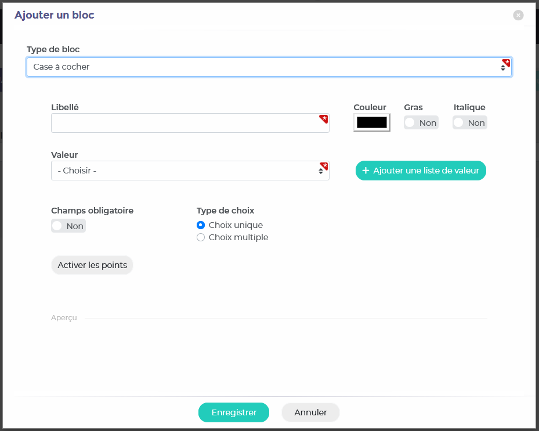
Pour les zones “case à cocher” et “liste de valeur” il sera possible de préciser si la réponse est obligatoire ou non, si elle est de type choix unique ou multiple, ainsi que d’associer des points à la réponse sélectionnée.

[![image.png](https://documentation.livia-parcoursdevie.fr/uploads/images/gallery/2024-04/scaled-1680-/y2Yimage.png)](https://documentation.livia-parcoursdevie.fr/uploads/images/gallery/2024-04/y2Yimage.png)
<span style="mso-no-proof: yes;"> </span>

Une fois la grille paramétrée il sera alors possible de la partager aux utilisateurs.

Attention, une fois partagée, la grille ne pourra plus voir son paramétrage modifié. Si une erreur a été faite ou si vous ne souhaitez plus utiliser une grille, il sera possible d’archivée celui-ci. Ainsi les grilles saisies par les utilisateurs seront conservées dans le dossier de l’usager, mais il ne sera plus possible d’en saisir de nouvelles sur ce modèle.

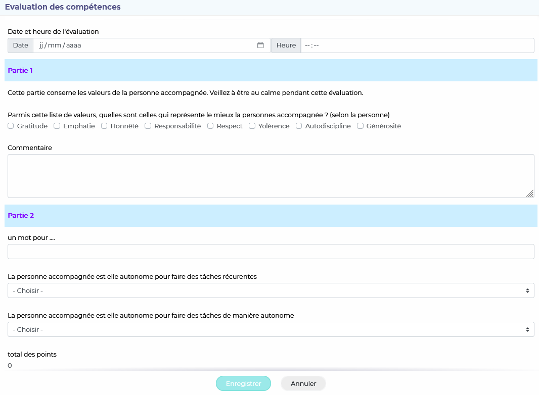
Exemple d’une grille :

[![image.png](https://documentation.livia-parcoursdevie.fr/uploads/images/gallery/2024-04/scaled-1680-/DNyimage.png)](https://documentation.livia-parcoursdevie.fr/uploads/images/gallery/2024-04/DNyimage.png)
<span style="mso-no-proof: yes;"> </span>

<table border="1" cellpadding="0" cellspacing="0" class="MsoTableGrid" id="bkmrk-activation-du-module-4" style="border-collapse: collapse; mso-table-layout-alt: fixed; border: none; mso-border-alt: solid #F4B083 1.5pt; mso-border-themecolor: accent2; mso-border-themetint: 153; mso-yfti-tbllook: 1696; mso-padding-alt: 0cm 5.4pt 0cm 5.4pt; mso-border-insideh: 1.5pt solid #F4B083; mso-border-insideh-themecolor: accent2; mso-border-insideh-themetint: 153; mso-border-insidev: 1.5pt solid #F4B083; mso-border-insidev-themecolor: accent2; mso-border-insidev-themetint: 153;"><tbody><tr style="mso-yfti-irow: 0; mso-yfti-firstrow: yes; mso-yfti-lastrow: yes; height: 15.0pt;"><td style="width: 538.5pt; border: solid #F4B083 1.5pt; mso-border-themecolor: accent2; mso-border-themetint: 153; background: #F7CAAC; mso-background-themecolor: accent2; mso-background-themetint: 102; padding: 0cm 5.4pt 0cm 5.4pt; height: 15.0pt;" valign="top" width="718"><u><span style="mso-fareast-font-family: Arial; mso-bidi-font-family: Arial; color: black; mso-color-alt: windowtext;">Activation du module</span></u><span style="mso-fareast-font-family: Arial; mso-bidi-font-family: Arial; color: black; mso-color-alt: windowtext;"> :</span>

<span style="mso-fareast-font-family: Arial; mso-bidi-font-family: Arial; color: black; mso-color-alt: windowtext;">L’accès au paramétrage des grilles est d’office disponible pour les utilisateurs ayant accès au module d’administration Livia</span>

<span style="mso-fareast-font-family: Arial; mso-bidi-font-family: Arial; color: black; mso-color-alt: windowtext;">Gestion des droits : Administration établissement - profils et utilisateurs – Profils - Sélection d’un profil - Gérer les droits – Evaluations – grilles personnalisées</span>

</td></tr></tbody></table>

### <a name="_Toc163722086"></a><span style="text-decoration: underline;"><span style="mso-fareast-font-family: Arial;"><span style="mso-list: Ignore;">1.3<span style="font: 7.0pt 'Times New Roman';"> </span></span></span>Prescriptions</span>

#### <a name="_Toc163722087"></a><span style="text-decoration: underline;"><span style="mso-fareast-font-family: Arial;"><span style="mso-list: Ignore;">1.3.1<span style="font: 7.0pt 'Times New Roman';"> </span></span></span>Historique d'une prescription médicamenteuse</span>

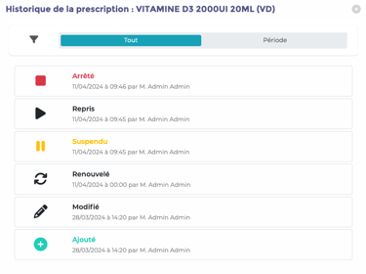
Pour chaque ligne de prescription, il est désormais possible d’afficher l’historique de la prescription.

Pour cela, cliquer sur les 3 points pour ouvrir le menu, puis « Afficher l’historique »

Il est possible de visualiser la mise en place, la modification, le renouvellement, la suspension, la reprise et l’arrêt d’une prescription, ainsi que la date, l’heure et l’auteur

[![image.png](https://documentation.livia-parcoursdevie.fr/uploads/images/gallery/2024-04/scaled-1680-/ubpimage.png)](https://documentation.livia-parcoursdevie.fr/uploads/images/gallery/2024-04/ubpimage.png)
#### <span style="text-decoration: underline;"><span style="mso-fareast-font-family: Arial;"><span style="mso-list: Ignore;">1.3.2<span style="font: 7.0pt 'Times New Roman';"> </span></span></span>Prescription : Remplacer Date/heure début par Maintenant</span>

Il n’est désormais plus nécessaire pour une prescription qui doit démarrer maintenant de saisir la date et l’heure. La fonction est remplacée par « Maintenant ». Le système calcule la date et l’heure d’enregistrement, pour éviter les erreurs d’horaire incorrect.

Pour les prescriptions dans le futur, il est toujours possible de choisir une date et une heure à venir.

### <a name="_Toc163722089"></a><span style="text-decoration: underline;"><span style="mso-fareast-font-family: Arial;"><span style="mso-list: Ignore;">1.4<span style="font: 7.0pt 'Times New Roman';"> </span></span></span>Bandeau</span>

#### <span style="text-decoration: underline;"><span style="mso-fareast-font-family: Arial;"><span style="mso-list: Ignore;">1.4.1<span style="font: 7.0pt 'Times New Roman';"> </span></span></span>Accès à l'appareillage depuis le bandeau usager v3</span>


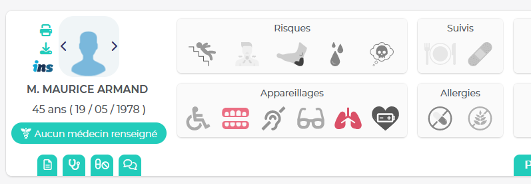
La zone “appareillages” est désormais accessible et fonctionnelle dans le bandeau usager. Celle-ci regroupe six icônes qui s’activerons si les éléments suivants sont complétés dans le dossier de l’usager :

[![image.png](https://documentation.livia-parcoursdevie.fr/uploads/images/gallery/2024-04/scaled-1680-/l4Rimage.png)](https://documentation.livia-parcoursdevie.fr/uploads/images/gallery/2024-04/l4Rimage.png)
<span style="mso-no-proof: yes;"> </span>

<span style="mso-spacerun: yes;"> </span><u>Icone mobilité</u>

Cette icone sera affichée si l’un des éléments suivants est sélectionné depuis les besoin et souhaits :

<span style="font-family: Symbol; mso-fareast-font-family: Symbol; mso-bidi-font-family: Symbol;"><span style="mso-list: Ignore;">·<span style="font: 7.0pt 'Times New Roman';"> </span></span></span>Capacités physiques &gt; Mobilité &gt; Autonomie déplacements intérieurs

<span style="font-family: 'Courier New'; mso-fareast-font-family: 'Courier New';"><span style="mso-list: Ignore;">o<span style="font: 7.0pt 'Times New Roman';"> </span></span></span>Canne

- <span style="font-family: 'Courier New'; mso-fareast-font-family: 'Courier New';"><span style="mso-list: Ignore;">o<span style="font: 7.0pt 'Times New Roman';"> </span></span></span>Déambulateur à cadre fixe
- <span style="font-family: 'Courier New'; mso-fareast-font-family: 'Courier New';"><span style="mso-list: Ignore;">o<span style="font: 7.0pt 'Times New Roman';"> </span></span></span>Déambulateur à 2 roues
- <span style="font-family: 'Courier New'; mso-fareast-font-family: 'Courier New';"><span style="mso-list: Ignore;">o<span style="font: 7.0pt 'Times New Roman';"> </span></span></span>Déambulateur à 3 roues
- <span style="font-family: 'Courier New'; mso-fareast-font-family: 'Courier New';"><span style="mso-list: Ignore;">o<span style="font: 7.0pt 'Times New Roman';"> </span></span></span>Déambulateur à 4 roues
- <span style="font-family: 'Courier New'; mso-fareast-font-family: 'Courier New';"><span style="mso-list: Ignore;">o<span style="font: 7.0pt 'Times New Roman';"> </span></span></span>Fauteuil roulant (ne pas afficher manuel simple si coché)
- <span style="font-family: 'Courier New'; mso-fareast-font-family: 'Courier New';"><span style="mso-list: Ignore;">o<span style="font: 7.0pt 'Times New Roman';"> </span></span></span>Fauteuil confort
- <span style="font-family: 'Courier New'; mso-fareast-font-family: 'Courier New';"><span style="mso-list: Ignore;">o<span style="font: 7.0pt 'Times New Roman';"> </span></span></span>Fauteuil coquille
- <span style="font-family: 'Courier New'; mso-fareast-font-family: 'Courier New';"><span style="mso-list: Ignore;">o<span style="font: 7.0pt 'Times New Roman';"> </span></span></span>Fauteuil électrique

<span style="font-family: Symbol; mso-fareast-font-family: Symbol; mso-bidi-font-family: Symbol;"><span style="mso-list: Ignore;">·<span style="font: 7.0pt 'Times New Roman';"> </span></span></span>Mobilité &gt; Autonomie déplacements extérieurs

- <span style="font-family: 'Courier New'; mso-fareast-font-family: 'Courier New';"><span style="mso-list: Ignore;">o<span style="font: 7.0pt 'Times New Roman';"> </span></span></span>Transport spécialisé
- <span style="font-family: 'Courier New'; mso-fareast-font-family: 'Courier New';"><span style="mso-list: Ignore;">o<span style="font: 7.0pt 'Times New Roman';"> </span></span></span>Véhicule adapté

Au survol de l'icône, le nom du matériel concerné sera affiché dans une info bulle.

<span style="mso-spacerun: yes;">[![image.png](https://documentation.livia-parcoursdevie.fr/uploads/images/gallery/2024-04/scaled-1680-/0Ajimage.png)](https://documentation.livia-parcoursdevie.fr/uploads/images/gallery/2024-04/0Ajimage.png) </span><u>Icone prothèse dentaire</u>

Cette icone sera affichée si l’un des éléments suivants est sélectionné depuis les besoin et souhaits :

<span style="font-family: Symbol; mso-fareast-font-family: Symbol; mso-bidi-font-family: Symbol;"><span style="mso-list: Ignore;">·<span style="font: 7.0pt 'Times New Roman';"> </span></span></span>Alimentation &gt; trouble et risque &gt; Dentition

<span style="font-family: 'Courier New'; mso-fareast-font-family: 'Courier New';"><span style="mso-list: Ignore;">o<span style="font: 7.0pt 'Times New Roman';"> </span></span></span>Prothèse dentaire haut

<span style="font-family: 'Courier New'; mso-fareast-font-family: 'Courier New';"><span style="mso-list: Ignore;">o<span style="font: 7.0pt 'Times New Roman';"> </span></span></span>Prothèse dentaire bas

Au survol de l'icône, le nom du matériel concerné sera affiché dans une info bulle.

[![image.png](https://documentation.livia-parcoursdevie.fr/uploads/images/gallery/2024-04/scaled-1680-/XCZimage.png)](https://documentation.livia-parcoursdevie.fr/uploads/images/gallery/2024-04/XCZimage.png) <span style="mso-spacerun: yes;"> </span><u>Icone prothèse auditive</u>

Cette icone sera affichée si l’un des éléments suivants est sélectionné depuis les besoin et souhaits :

<span style="font-family: Symbol; mso-fareast-font-family: Symbol; mso-bidi-font-family: Symbol;"><span style="mso-list: Ignore;">·<span style="font: 7.0pt 'Times New Roman';"> </span></span></span>Orientation et sens &gt; l’ouïe &gt; appareils auditifs si oui

- <span style="font-family: 'Courier New'; mso-fareast-font-family: 'Courier New';"><span style="mso-list: Ignore;">o<span style="font: 7.0pt 'Times New Roman';"> </span></span></span>Appareil auditif gauche
- <span style="font-family: 'Courier New'; mso-fareast-font-family: 'Courier New';"><span style="mso-list: Ignore;">o<span style="font: 7.0pt 'Times New Roman';"> </span></span></span>Appareil auditif droit

Au survol de l'icône, le nom du matériel concerné sera affiché dans une info bulle.

[![image.png](https://documentation.livia-parcoursdevie.fr/uploads/images/gallery/2024-04/scaled-1680-/Eo2image.png)](https://documentation.livia-parcoursdevie.fr/uploads/images/gallery/2024-04/Eo2image.png)<span style="text-decoration: underline;"><span style="mso-spacerun: yes;"> </span>Icone aide à la vue</span>

Cette icone sera affichée si l’un des éléments suivants est sélectionné depuis les besoin et souhaits :

<span style="font-family: Symbol; mso-fareast-font-family: Symbol; mso-bidi-font-family: Symbol;"><span style="mso-list: Ignore;">·<span style="font: 7.0pt 'Times New Roman';"> </span></span></span>Orientation et sens &gt; la vue &gt; Correction vision :

- <span style="font-family: 'Courier New'; mso-fareast-font-family: 'Courier New';"><span style="mso-list: Ignore;">o<span style="font: 7.0pt 'Times New Roman';"> </span></span></span>Lunettes
- <span style="font-family: 'Courier New'; mso-fareast-font-family: 'Courier New';"><span style="mso-list: Ignore;">o<span style="font: 7.0pt 'Times New Roman';"> </span></span></span>Lentilles
- <span style="font-family: 'Courier New'; mso-fareast-font-family: 'Courier New';"><span style="mso-list: Ignore;">o<span style="font: 7.0pt 'Times New Roman';"> </span></span></span>Loupe
- <span style="font-family: 'Courier New'; mso-fareast-font-family: 'Courier New';"><span style="mso-list: Ignore;">o<span style="font: 7.0pt 'Times New Roman';"> </span></span></span>Autre

Au survol de l'icône, le nom du matériel concerné sera affiché dans une info bulle.

<span style="mso-spacerun: yes;"> </span>

[![image.png](https://documentation.livia-parcoursdevie.fr/uploads/images/gallery/2024-04/scaled-1680-/TwFimage.png)](https://documentation.livia-parcoursdevie.fr/uploads/images/gallery/2024-04/TwFimage.png)<span style="mso-spacerun: yes;"> </span>I<span style="text-decoration: underline;"><span style="color: rgb(0, 0, 0); text-decoration: underline;">cone appareil respiratoire</span></span>

Cette icone sera affichée si l’un des éléments suivants est sélectionné depuis les besoin et souhaits :

<span style="font-family: Symbol; mso-fareast-font-family: Symbol; mso-bidi-font-family: Symbol;"><span style="mso-list: Ignore;">·<span style="font: 7.0pt 'Times New Roman';"> </span></span></span>Fonction respiratoire

- <span style="font-family: 'Courier New'; mso-fareast-font-family: 'Courier New';"><span style="mso-list: Ignore;">o<span style="font: 7.0pt 'Times New Roman';"> </span></span></span>Oxygénothérapie continue
- <span style="font-family: 'Courier New'; mso-fareast-font-family: 'Courier New';"><span style="mso-list: Ignore;">o<span style="font: 7.0pt 'Times New Roman';"> </span></span></span>Oxygénothérapie discontinue
- <span style="font-family: 'Courier New'; mso-fareast-font-family: 'Courier New';"><span style="mso-list: Ignore;">o<span style="font: 7.0pt 'Times New Roman';"> </span></span></span>Sonde nasale à oxygène
- <span style="font-family: 'Courier New'; mso-fareast-font-family: 'Courier New';"><span style="mso-list: Ignore;">o<span style="font: 7.0pt 'Times New Roman';"> </span></span></span>Lunettes à oxygène
- <span style="font-family: 'Courier New'; mso-fareast-font-family: 'Courier New';"><span style="mso-list: Ignore;">o<span style="font: 7.0pt 'Times New Roman';"> </span></span></span>Masque
- <span style="font-family: 'Courier New'; mso-fareast-font-family: 'Courier New';"><span style="mso-list: Ignore;">o<span style="font: 7.0pt 'Times New Roman';"> </span></span></span>Source d'oxygène fixe
- <span style="font-family: 'Courier New'; mso-fareast-font-family: 'Courier New';"><span style="mso-list: Ignore;">o<span style="font: 7.0pt 'Times New Roman';"> </span></span></span>Oxygénothérapie de déambulation
- <span style="font-family: 'Courier New'; mso-fareast-font-family: 'Courier New';"><span style="mso-list: Ignore;">o<span style="font: 7.0pt 'Times New Roman';"> </span></span></span>Concentrateur à oxygène
- <span style="font-family: 'Courier New'; mso-fareast-font-family: 'Courier New';"><span style="mso-list: Ignore;">o<span style="font: 7.0pt 'Times New Roman';"> </span></span></span>Apnée du sommeil : CPAP
- <span style="font-family: 'Courier New'; mso-fareast-font-family: 'Courier New';"><span style="mso-list: Ignore;">o<span style="font: 7.0pt 'Times New Roman';"> </span></span></span>Apnée du sommeil : "afficher ce qui est saisi dans autre"

Au survol de l'icône, le nom du matériel concerné sera affiché dans une info bulle.

[![image.png](https://documentation.livia-parcoursdevie.fr/uploads/images/gallery/2024-04/scaled-1680-/2Uhimage.png)](https://documentation.livia-parcoursdevie.fr/uploads/images/gallery/2024-04/2Uhimage.png)<span style="text-decoration: underline;"><span style="mso-spacerun: yes;"> </span>Icone pacemaker</span>

Cette icone sera affichée si dans le bloc pathologie ou antécédents, les cotations Z95 et/ou Z95.0 sont sélectionnées

Au survol de l'icône, le nom du matériel concerné sera affiché dans une info bulle.

#### <a name="_Toc163722091"></a><span style="text-decoration: underline;"><span style="mso-fareast-font-family: Arial;"><span style="mso-list: Ignore;">1.4.2<span style="font: 7.0pt 'Times New Roman';"> </span></span></span>Bandeau : Afficher le prochain rendez-vous dans le bandeau</span>

Dans la partie droite du bandeau l’encart “prochaine rendez-vous" est désormais actif.

Vous pourrez y retrouver la date et heure du prochaine rendez-vous externe. Au survol de la zone le libellé sera précisé.

Si le rendez-vous externe à lieu dans mois de 24h, le bloc sera bleu, si le rendez-vous à lieu de plus de 24h alors le bloc sera gris. Un clic sur cet encart vous affichera le planning de l’usager

[![image.png](https://documentation.livia-parcoursdevie.fr/uploads/images/gallery/2024-04/scaled-1680-/AF1image.png)](https://documentation.livia-parcoursdevie.fr/uploads/images/gallery/2024-04/AF1image.png)

<span style="mso-no-proof: yes;"> </span>

#### <a name="_Toc163722092"></a><span style="text-decoration: underline;"><span style="mso-fareast-font-family: Arial;"><span style="mso-list: Ignore;">1.4.3<span style="font: 7.0pt 'Times New Roman';"> </span></span></span>Bandeau : Afficher le dernier laboratoire dans le bandeau</span>

Dans la partie droite du bandeau l’encart “dernier résultat laboratoire” est désormais actif.

Dans ce bloque il sera fait mention de la date du dernier résultat laboratoire.

Si le résultat date de moins de 24h le bloque sera bleu, si le résultat date de plus de 24h alors le bloque sera gris. Un clic sur cet encart vous affichera la fonctionnalité “laboratoire” du dossier médical de l’usager.

<span style="mso-no-proof: yes;"> </span>

<table border="1" cellpadding="0" cellspacing="0" class="MsoTableGrid" id="bkmrk-activation-du-module-5" style="border-collapse: collapse; mso-table-layout-alt: fixed; border: none; mso-border-alt: solid #F4B083 1.5pt; mso-border-themecolor: accent2; mso-border-themetint: 153; mso-yfti-tbllook: 1696; mso-padding-alt: 0cm 5.4pt 0cm 5.4pt; mso-border-insideh: 1.5pt solid #F4B083; mso-border-insideh-themecolor: accent2; mso-border-insideh-themetint: 153; mso-border-insidev: 1.5pt solid #F4B083; mso-border-insidev-themecolor: accent2; mso-border-insidev-themetint: 153;"><tbody><tr style="mso-yfti-irow: 0; mso-yfti-firstrow: yes; mso-yfti-lastrow: yes; height: 15.0pt;"><td style="width: 538.5pt; border: solid #F4B083 1.5pt; mso-border-themecolor: accent2; mso-border-themetint: 153; background: #F7CAAC; mso-background-themecolor: accent2; mso-background-themetint: 102; padding: 0cm 5.4pt 0cm 5.4pt; height: 15.0pt;" valign="top" width="718"><u><span style="mso-fareast-font-family: Arial; mso-bidi-font-family: Arial; color: black; mso-color-alt: windowtext;">Activation du module</span></u><span style="mso-fareast-font-family: Arial; mso-bidi-font-family: Arial; color: black; mso-color-alt: windowtext;"> :</span>

<span style="mso-fareast-font-family: Arial; mso-bidi-font-family: Arial; color: black; mso-color-alt: windowtext;">Aucunes actions liées aux droits n’est nécessaire pour l’activation des fonctionnalités du bandeau</span>

</td></tr></tbody></table>

[![image.png](https://documentation.livia-parcoursdevie.fr/uploads/images/gallery/2024-04/scaled-1680-/xadimage.png)](https://documentation.livia-parcoursdevie.fr/uploads/images/gallery/2024-04/xadimage.png)

### <span style="text-decoration: underline;"><span style="mso-fareast-font-family: Arial;"><span style="mso-list: Ignore;">1.5<span style="font: 7.0pt 'Times New Roman';"> </span></span></span>Edition</span>

<span style="mso-bidi-font-family: Arial; color: black; mso-themecolor: text1;">Pointage des présences</span>

<span style="mso-bidi-font-family: Arial; color: black; mso-themecolor: text1;">Prévision des présences</span>

<span style="mso-bidi-font-family: Arial; color: black; mso-themecolor: text1;">Budget personnel</span>

## <a name="_Toc163722093"></a><span style="text-decoration: underline;"><span style="mso-fareast-font-family: Arial;"><span style="mso-list: Ignore;">2.<span style="font: 7.0pt 'Times New Roman';"> </span></span></span>EVOLUTION</span>

### <a name="_Toc163722094"></a><span style="text-decoration: underline;"><span style="mso-fareast-font-family: Arial;"><span style="mso-list: Ignore;">2.1<span style="font: 7.0pt 'Times New Roman';"> </span></span></span>Refonte ergonomique de la fiche de chute</span>

Par soucis de cohérence ergonomique, la fiche de chute a été revu, afin de correspondre aux nouveaux standards définis par la fiche des crises d’épilepsie.

### <span style="text-decoration: underline;"><a name="_Toc163722095"></a><span style="mso-fareast-font-family: Arial;"><span style="mso-list: Ignore;">2.2<span style="font: 7.0pt 'Times New Roman';"> </span></span></span>Transmissions narratives : ajout de catégories</span>

Les catégories suivantes ont été ajoutées dans les transmissions narratives :

<span style="font-size: 10.5pt; line-height: 107%; font-family: 'Segoe UI',sans-serif; color: #172b4d; letter-spacing: -.05pt;">Partenaire, Stage, Épilepsie, Hospitalisation, Vie quotidienne, Temps du quotidien, Crises, Vie scolaire, Départ/retour, Décès, Hospitalisation, Visite du médecin, Scolarité, Emploi, Fugue, Droit de visite et hébergement, Vêture, Médiations éducatives, Absence, Retard, Cahier infirmerie, Info sociale, Guidance parentale</span>

Elles ne sont pas disponibles par défaut et doivent être activées dans la gestion des droits

### <a name="_Toc163722096"></a><span style="text-decoration: underline;"><span style="mso-fareast-font-family: Arial;"><span style="mso-list: Ignore;">2.3<span style="font: 7.0pt 'Times New Roman';"> </span></span></span>Fiche administrative - Ajout du code naissance INSEE</span>

Dans la fiche administrative, le code INSEE du lieu de naissance a été ajouté. Il se remplit automatiquement :

<span style="font-family: 'Calibri',sans-serif; mso-fareast-font-family: Calibri;"><span style="mso-list: Ignore;">-<span style="font: 7.0pt 'Times New Roman';"> </span></span></span>Selon le code postal pour les villes françaises

<span style="font-family: 'Calibri',sans-serif; mso-fareast-font-family: Calibri;"><span style="mso-list: Ignore;">-<span style="font: 7.0pt 'Times New Roman';"> </span></span></span>Selon le code du pays, pour les pays autres que la France

### <a name="_Toc163722097"></a><span style="text-decoration: underline;"><span style="mso-fareast-font-family: Arial;"><span style="mso-list: Ignore;">2.4<span style="font: 7.0pt 'Times New Roman';"> </span></span></span>Utilisateurs : ajout d’une option : ne pas divulguer mes informations personnelles</span>

Dans le menu « Mon profil », il est désormais possible d’activer l’option « Ne pas divulguer mes informations personnelles », afin qu’un utilisateur puisse masquer ou non son adresse mail et son numéro de téléphone dans l’annuaire

### <a name="_Toc163722098"></a><span style="text-decoration: underline;"><span style="mso-fareast-font-family: Arial;"><span style="mso-list: Ignore;">2.5<span style="font: 7.0pt 'Times New Roman';"> </span></span></span>Indicateurs/ANAP par secteurs/activité/classe/groupe/atelier</span>

Il est désormais possible de filtrer l’enquête ANAP en fonction des différentes modes de regroupements existant pour l’établissement de connexion.

<span style="mso-no-proof: yes;"> </span>

### <a name="_Toc163722099"></a><span style="text-decoration: underline;"><span style="mso-fareast-font-family: Arial;"><span style="mso-list: Ignore;">2.6<span style="font: 7.0pt 'Times New Roman';"> </span></span></span>Ecrits professionnels</span>

#### <a name="_Toc163722100"></a><span style="text-decoration: underline;"><span style="mso-fareast-font-family: Arial;"><span style="mso-list: Ignore;">2.6.1<span style="font: 7.0pt 'Times New Roman';"> </span></span></span>Optimisation de l'écran des écrits professionnels</span>

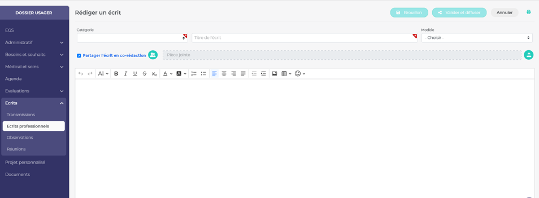
L’écran de saisi des écrits professionnels a été optimisé, de manière à rendre plus agréable l’utilisation de celui-ci. La zone de saisi prend à présent tout l’espace disponible à l’écran.

[![image.png](https://documentation.livia-parcoursdevie.fr/uploads/images/gallery/2024-04/scaled-1680-/lw2image.png)](https://documentation.livia-parcoursdevie.fr/uploads/images/gallery/2024-04/lw2image.png)
#### <a name="_Toc163722101"></a><span style="text-decoration: underline;"><span style="mso-fareast-font-family: Arial;"><span style="mso-list: Ignore;">2.6.2<span style="font: 7.0pt 'Times New Roman';"> </span></span></span>Pré-cocher les corédacteurs lors de la validation d'un écrit professionnels</span>

Lors de la validation d’un écrit professionnel rédigé en corédaction, les corédacteurs seront à présent automatiquement présélectionnés.

### <a name="_Toc163722102"></a><span style="text-decoration: underline;"><span style="mso-fareast-font-family: Arial;"><span style="mso-list: Ignore;">2.7<span style="font: 7.0pt 'Times New Roman';"> </span></span></span>Crises d'épilepsie - ajout d'un compteur individuel</span>

A partir de l’écran récapitulatif de la fonctionnalité “crise d’épilepsie”, il est à présent possible de consulter le nombre de crises ayant été déclarées sur une période.

L’utilisateur pourra filtrer sur les périodes suivantes :

- <span style="font-family: 'Calibri',sans-serif; mso-fareast-font-family: Calibri;"><span style="mso-list: Ignore;">-<span style="font: 7.0pt 'Times New Roman';"> </span></span></span>Depuis 1 mois
- <span style="font-family: 'Calibri',sans-serif; mso-fareast-font-family: Calibri;"><span style="mso-list: Ignore;">-<span style="font: 7.0pt 'Times New Roman';"> </span></span></span>Depuis 2 mois
- <span style="font-family: 'Calibri',sans-serif; mso-fareast-font-family: Calibri;"><span style="mso-list: Ignore;">-<span style="font: 7.0pt 'Times New Roman';"> </span></span></span>Depuis 6 mois
- <span style="font-family: 'Calibri',sans-serif; mso-fareast-font-family: Calibri;"><span style="mso-list: Ignore;">-<span style="font: 7.0pt 'Times New Roman';"> </span></span></span>Depuis 1 an
- <span style="font-family: 'Calibri',sans-serif; mso-fareast-font-family: Calibri;"><span style="mso-list: Ignore;">-<span style="font: 7.0pt 'Times New Roman';"> </span></span></span>Cette année
- <span style="font-family: 'Calibri',sans-serif; mso-fareast-font-family: Calibri;"><span style="mso-list: Ignore;">-<span style="font: 7.0pt 'Times New Roman';"> </span></span></span>Entre deux dates

Par défaut la période affichée est “Depuis an”.

<span style="mso-no-proof: yes;"> </span>

### <span style="text-decoration: underline;"><span style="mso-fareast-font-family: Arial;"><span style="mso-list: Ignore;">2.8<span style="font: 7.0pt 'Times New Roman';"> </span></span></span><span style="mso-spacerun: yes;"> </span><a name="_Toc163722104"></a>Administratif : ajout d’un champ commentaire dans la situation familiale</span>

Une zone commentaire a été ajoutée dans le bloc “situation familiale” du dossier administratif de l’usager.

<span style="mso-no-proof: yes;"> </span>

### <span style="text-decoration: underline;"><span style="mso-fareast-font-family: Arial;"><span style="mso-list: Ignore;">2.9<span style="font: 7.0pt 'Times New Roman';"> </span></span></span>Budget personnel : ajout bouton débit et crédit</span>

Dans le but de faciliter la saisie des opérations de débit et de crédit, des boutons d’actions ont été ajoutés directement sur les lignes de type de dépenses.

<span style="mso-no-proof: yes;"> </span>

### <span style="text-decoration: underline;"><span style="color: rgb(0, 0, 0); text-decoration: underline;">2.10 Chargement du planning établissement </span></span>

  
Il a été constaté pour les bases multi-établissement que le planning pouvait être long à charger. En effet,   
l’ensemble des plannings étaient chargés à l’ouverture afin d’afficher les plannings croisés des usagers.

Désormais, seul le planning de l’établissement sera chargé. Il sera toujours possible de charger l’ensemble   
des plannings via une option disponible dans la boite à filtres

### <span style="text-decoration: underline;">2.11 <span class="NormalTextRun SCXW206305186 BCX0" data-ccp-parastyle="Titre 2 - Arche MC2">Optimisation des temps de chargement</span> </span>

<div class="ListContainerWrapper SCXW81183907 BCX0" id="bkmrk-liste-des-usagers-%3A-">- <span class="TextRun Underlined SCXW81183907 BCX0" data-contrast="auto" lang="FR-FR" xml:lang="FR-FR"><span class="NormalTextRun SCXW81183907 BCX0">Liste des usagers</span> </span><span class="TextRun SCXW81183907 BCX0" data-contrast="auto" lang="FR-FR" xml:lang="FR-FR"><span class="NormalTextRun SCXW81183907 BCX0">: </span><span class="NormalTextRun SCXW81183907 BCX0">la liste ne charge maintenant les photos que pour les usagers</span><span class="NormalTextRun SCXW81183907 BCX0"> avec un séjour en cours et non pour les usagers non présent</span><span class="NormalTextRun SCXW81183907 BCX0">s.</span></span><span class="EOP SCXW81183907 BCX0" data-ccp-props="{"201341983":0,"335559739":160,"335559740":259}"> </span>

</div><div class="ListContainerWrapper SCXW81183907 BCX0" id="bkmrk-widget-traitement%C2%A0%3A-">- <span class="TextRun Underlined SCXW81183907 BCX0" data-contrast="auto" lang="FR-FR" xml:lang="FR-FR"><span class="NormalTextRun SCXW81183907 BCX0">Widget traitement :</span></span><span class="TextRun SCXW81183907 BCX0" data-contrast="auto" lang="FR-FR" xml:lang="FR-FR"><span class="NormalTextRun SCXW81183907 BCX0"> par défaut le filtre se place sur 3 jours et charge les informations que sur 3 jours</span><span class="NormalTextRun SCXW81183907 BCX0">.</span></span>

</div><span class="TextRun SCXW81183907 BCX0" data-contrast="auto" lang="FR-FR" xml:lang="FR-FR"><span class="NormalTextRun SCXW81183907 BCX0">Si l’utilisateur choisit le filtre 15 jours, il y aura un chargement et un affichage des données sur 15 jours</span></span><span class="TextRun SCXW81183907 BCX0" data-contrast="auto" lang="FR-FR" xml:lang="FR-FR"><span class="NormalTextRun SCXW81183907 BCX0">.</span></span><span class="EOP SCXW81183907 BCX0" data-ccp-props="{"134233117":false,"134233118":false,"201341983":0,"335551550":1,"335551620":1,"335559685":720,"335559738":0,"335559739":160,"335559740":259,"469777462":[1440],"469777927":[0],"469777928":[1]}"> </span>

<div class="ListContainerWrapper SCXW81183907 BCX0" id="bkmrk-widget-mouvement%C2%A0%3A-p">- <span class="TextRun Underlined SCXW81183907 BCX0" data-contrast="auto" lang="FR-FR" xml:lang="FR-FR"><span class="NormalTextRun SCXW81183907 BCX0">Widget mouvement</span></span><span class="TextRun SCXW81183907 BCX0" data-contrast="auto" lang="FR-FR" xml:lang="FR-FR"><span class="NormalTextRun SCXW81183907 BCX0"> : par défaut le filtre se place sur 3 jours et charge les infos que sur 3 </span><span class="NormalTextRun SCXW81183907 BCX0">jours</span><span class="NormalTextRun SCXW81183907 BCX0">.</span></span><span class="EOP SCXW81183907 BCX0" data-ccp-props="{"134233117":false,"134233118":false,"201341983":0,"335551550":0,"335551620":0,"335559738":0,"335559739":160,"335559740":259,"469777462":[1440],"469777927":[0],"469777928":[1]}"> </span>

</div><span class="TextRun SCXW81183907 BCX0" data-contrast="auto" lang="FR-FR" xml:lang="FR-FR"><span class="NormalTextRun SCXW81183907 BCX0">Si</span><span class="NormalTextRun SCXW81183907 BCX0"> l’utilisateur choisit le filtre 15 jours, il y aura un chargement et un affichage des données sur 15 jours.</span></span><span class="EOP SCXW81183907 BCX0" data-ccp-props="{"134233117":false,"134233118":false,"201341983":0,"335551550":0,"335551620":0,"335559685":720,"335559738":0,"335559739":160,"335559740":259,"469777462":[1440],"469777927":[0],"469777928":[1]}"> </span>

<span class="TextRun SCXW81183907 BCX0" data-contrast="auto" lang="FR-FR" xml:lang="FR-FR"><span class="NormalTextRun SCXW81183907 BCX0">Onglet absence en cours : </span><span class="NormalTextRun SCXW81183907 BCX0">apparaît</span><span class="NormalTextRun SCXW81183907 BCX0"> dans cet onglet </span><span class="NormalTextRun SCXW81183907 BCX0">que</span><span class="NormalTextRun SCXW81183907 BCX0"> les usagers dont une absence a été saisie et que cette absence est en cours, quel que soit le type d’absence. Affich</span><span class="NormalTextRun SCXW81183907 BCX0">age d</span><span class="NormalTextRun SCXW81183907 BCX0">es usagers revenus dans la journée, jusque 23h59. Uniquement</span> <span class="NormalTextRun SCXW81183907 BCX0">pour</span><span class="NormalTextRun SCXW81183907 BCX0"> les </span><span class="NormalTextRun SCXW81183907 BCX0">usagers avec un séjour en cours</span></span><span class="TextRun SCXW81183907 BCX0" data-contrast="auto" lang="FR-FR" xml:lang="FR-FR"><span class="NormalTextRun SCXW81183907 BCX0">.</span></span><span class="EOP SCXW81183907 BCX0" data-ccp-props="{"134233117":false,"134233118":false,"201341983":0,"335551550":0,"335551620":0,"335559685":720,"335559738":0,"335559739":160,"335559740":259,"469777462":[1440],"469777927":[0],"469777928":[1]}"> </span>

<div class="ListContainerWrapper SCXW81183907 BCX0" id="bkmrk-widget-selles%C2%A0%3A-supp">- <span class="TextRun Underlined SCXW81183907 BCX0" data-contrast="auto" lang="FR-FR" xml:lang="FR-FR"><span class="NormalTextRun SCXW81183907 BCX0">Widget selles</span></span><span class="TextRun SCXW81183907 BCX0" data-contrast="auto" lang="FR-FR" xml:lang="FR-FR"><span class="NormalTextRun SCXW81183907 BCX0"> : </span><span class="NormalTextRun SCXW81183907 BCX0">s</span><span class="NormalTextRun SCXW81183907 BCX0">uppression du </span><span class="NormalTextRun SpellingErrorV2Themed SCXW81183907 BCX0">find</span> <span class="NormalTextRun SpellingErrorV2Themed SCXW81183907 BCX0">list</span><span class="NormalTextRun SCXW81183907 BCX0">. La recherche se base sur la présence ou non d’une transmission automatique selle ouverte pour afficher l’usager dans le widget.</span></span><span class="EOP SCXW81183907 BCX0" data-ccp-props="{"134233117":false,"134233118":false,"201341983":0,"335551550":0,"335551620":0,"335559738":0,"335559739":160,"335559740":259,"469777462":[1440],"469777927":[0],"469777928":[1]}"> </span>

</div><span class="TextRun SCXW81183907 BCX0" data-contrast="auto" lang="FR-FR" xml:lang="FR-FR"><span class="NormalTextRun SCXW81183907 BCX0">Si la transmission automatique selles est ouverte, l’usager doit apparaître.</span></span><span class="EOP SCXW81183907 BCX0" data-ccp-props="{"134233117":false,"134233118":false,"201341983":0,"335551550":0,"335551620":0,"335559685":720,"335559738":0,"335559739":160,"335559740":259,"469777462":[1440],"469777927":[0],"469777928":[1]}"> </span>

<div class="ListContainerWrapper SCXW81183907 BCX0" id="bkmrk-widget-rdv%C2%A0%3A-par-d%C3%A9f">- <span class="TextRun Underlined SCXW81183907 BCX0" data-contrast="auto" lang="FR-FR" xml:lang="FR-FR"><span class="NormalTextRun SCXW81183907 BCX0">Widget rdv</span></span><span class="TextRun SCXW81183907 BCX0" data-contrast="auto" lang="FR-FR" xml:lang="FR-FR"><span class="NormalTextRun SCXW81183907 BCX0"> : par défaut pour l’interne et l’externe</span><span class="NormalTextRun SCXW81183907 BCX0">,</span><span class="NormalTextRun SCXW81183907 BCX0"> le filtre se place sur 3 jours et charge les informations que sur 3 jours. </span></span><span class="LineBreakBlob BlobObject DragDrop SCXW81183907 BCX0"><span class="SCXW81183907 BCX0"> </span>  
    </span><span class="TextRun SCXW81183907 BCX0" data-contrast="auto" lang="FR-FR" xml:lang="FR-FR"><span class="NormalTextRun SCXW81183907 BCX0">Si l’utilisateur choisit le filtre 15 jours, il y aura un chargement et un affichage des données sur 15 jours etc…</span></span><span class="EOP SCXW81183907 BCX0" data-ccp-props="{"134233117":false,"134233118":false,"201341983":0,"335551550":0,"335551620":0,"335559738":0,"335559739":160,"335559740":276,"469777462":[1440],"469777927":[0],"469777928":[1]}"> </span>

</div>### <span style="text-decoration: underline;"><span style="mso-fareast-font-family: Arial;"><span style="mso-list: Ignore;">2.12</span></span> Éditions</span>

<span style="mso-bidi-font-family: Arial; color: black; mso-themecolor: text1;">DLU (Contact, INS, Vaccins)-</span>

<span style="mso-bidi-font-family: Arial; color: black; mso-themecolor: text1;">Fiche Traitements</span>

<span style="mso-bidi-font-family: Arial; color: black; mso-themecolor: text1;">PMT :<span style="mso-spacerun: yes;"> </span>Les champs Nom, prénom, adresse et N° SS sont désormais préremplis. L’édition est également possible depuis le menu d’impression rapide du bandeau usager</span>

<span style="mso-bidi-font-family: Arial; color: black; mso-themecolor: text1;"> </span>

### <span style="text-decoration: underline;"><span style="color: black; text-decoration: underline;">2.13 Rapport annuel d'activité médicale</span></span>

Afin d’optimiser les temps sur des calculs complexes, l’édition du RAMA s’effectue désormais en téléchargement asynchrone. L’état d’avancement ainsi que son téléchargement final se font à partir des impressions demandées (boite à outils).

### <span style="text-decoration: underline;">2.14 Lexique besoins et souhaits</span>

Dans le lexique des besoins et souhaits, dans la section alimentation puis dans la partie régime et texture, ont été ajoutés les éléments suivants :

Régime:

- Sans lactose
- Sans gluten
- Allergie
- Diabétique
- Hyper-protéiné

Texture:

- Haché lubrifié
- Tendre
- Sans dispersible
- Fondant
- Mixé lisse

### <span style="text-decoration: underline;"><span style="color: rgb(0, 0, 0); text-decoration: underline;">2.15 Le dossier médical partagé </span></span>

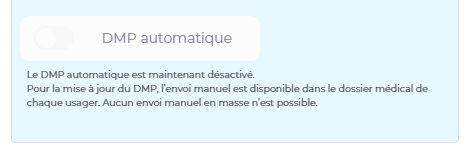
<span class="TextRun SCXW227550133 BCX0" data-contrast="auto" lang="FR-FR" xml:lang="FR-FR"><span class="NormalTextRun SCXW227550133 BCX0">Désormais, </span><span class="NormalTextRun SCXW227550133 BCX0">il est possible de désactiver le DMP </span><span class="NormalTextRun SCXW227550133 BCX0">automatique </span><span class="NormalTextRun SCXW227550133 BCX0">depuis l’administration de l’établi</span><span class="NormalTextRun SCXW227550133 BCX0">ssement</span><span class="NormalTextRun SCXW227550133 BCX0"> et l’interface dédiée. </span><span class="NormalTextRun SCXW227550133 BCX0">L’option du DMP automatique est activée par défaut. En cas de désactivation, </span><span class="NormalTextRun SCXW227550133 BCX0">elle </span><span class="NormalTextRun SCXW227550133 BCX0">peut-être</span><span class="NormalTextRun SCXW227550133 BCX0"> réactivée à postériori. </span></span><span class="EOP SCXW227550133 BCX0" data-ccp-props="{}"> </span>

<span class="TextRun SCXW227550133 BCX0" data-contrast="auto" lang="FR-FR" xml:lang="FR-FR"><span class="NormalTextRun SCXW227550133 BCX0">A</span><span class="NormalTextRun SCXW227550133 BCX0">près</span><span class="NormalTextRun SCXW227550133 BCX0"> la désactivation du DMP automatique, il faudra</span><span class="NormalTextRun SCXW227550133 BCX0"> ensuite</span><span class="NormalTextRun SCXW227550133 BCX0"> procéder à l’envoi manuel </span><span class="NormalTextRun SCXW227550133 BCX0">de celui-ci </span><span class="NormalTextRun SCXW227550133 BCX0">depuis </span><span class="NormalTextRun SCXW227550133 BCX0">l</span><span class="NormalTextRun SCXW227550133 BCX0">e dossier médical de chaq</span><span class="NormalTextRun SCXW227550133 BCX0">ue usager.</span></span><span class="EOP SCXW227550133 BCX0" data-ccp-props="{}"> </span>

<span class="SCXW227550133 BCX0"><span class="WACImageContainer NoPadding DragDrop BlobObject SCXW227550133 BCX0" role="presentation">![](https://documentation.livia-parcoursdevie.fr/uploads/images/gallery/2025-02/embedded-image-rxgrldg0.png)</span></span><span class="EOP SCXW227550133 BCX0" data-ccp-props="{"335551550":2,"335551620":2}"></span>